THREE PLACES TO START

Less someday.
More done.

A sales conversation worth preparing for. A campaign waiting to happen. A recurring task that needs a better system. Start with the work already on your desk.

01 / SALES RESEARCH & PROSPECTING

Walk in
with context.

For business owners and sales teams who spend too much time gathering background before they can have a useful conversation.

Start with an account or an ideal customer.

Recon’s Intent Engine can begin with a company, a website, an industry, or your ideal customer profile. Give it the audience, what you sell, and the question you need answered. Specific context makes the research easier to review and the next conversation more relevant.

EXAMPLE BRIEF / ADAPT IT TO YOUR BUSINESS

“Research this account’s business and likely priorities. Cite the sources. Suggest three relevant questions and an opening for our first conversation.”

From research to a next step.

  1. Set the target. Supply an account or describe the customer profile you want to explore.
  2. Inspect the evidence. Review the research, citations, and proposed pitch. Separate sourced facts from suggested angles.
  3. Keep the follow-up close. Use Clients CRM to track the owner, deal stage, and next action.

What you can take away.

An account brief, source-backed context, and a draft opening you can refine. The opportunity is a better-prepared conversation; the quality of the inputs and your review still matter. Paid enrichment in the internal build is a separate capability and is not assumed in this example.

Bring a public company website to your demo. We’ll show the research workflow and how it connects to the rest of your workspace.

Explore Recon and Clients CRM ↗
02 / AI CONTENT IN YOUR BRAND VOICE

A good idea.
More ways out.

For teams with something useful to say and too little time to turn it into consistent content.
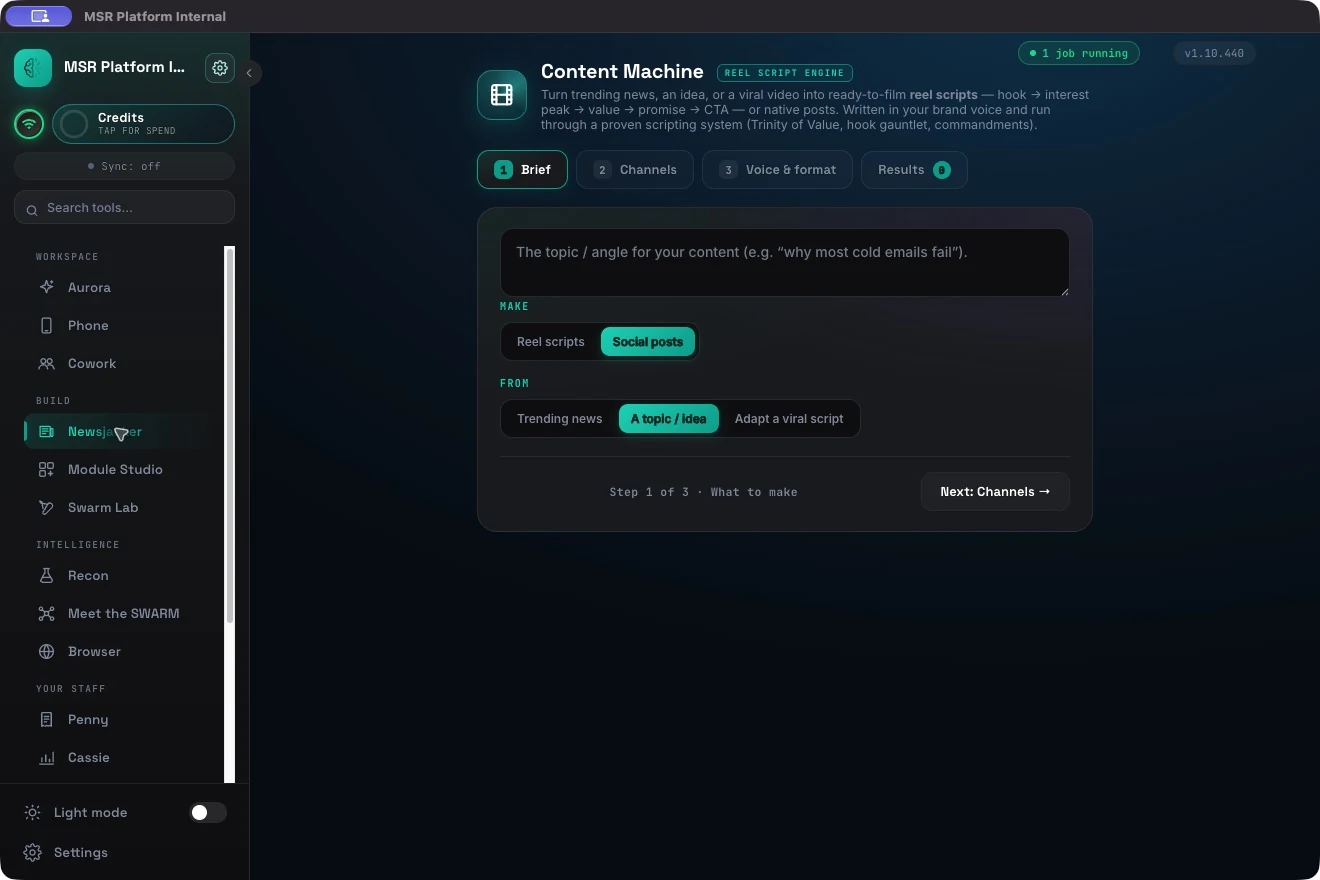
CONTENT MACHINE / START WITH A BRIEFACTUAL APP
The Content Machine brief screen, captured in the running app.

Bring the angle. Keep your voice.

Content Machine starts with trending news, a topic, or a script you want to adapt. Choose reel scripts or social posts, set the channels, then define the voice and format. Your business context gives the work a clearer audience and purpose.

EXAMPLE BRIEF / ADAPT IT TO YOUR BUSINESS

“Turn our new service into a short reel script and a launch post. Speak to business owners. Lead with their problem, explain the change, and close with a clear next step.”

Give the message a shape.

  1. Set the brief. Describe the topic, audience, and intended action.
  2. Choose the channel. Adapt the idea to a reel or a social post, with voice and format set deliberately.
  3. Review the draft. Check the hook, supporting claims, tone, and call to action before filming or publishing.

What you can take away.

A reel script with an opening, development, value, and call to action—or a native social draft shaped around the same idea. These are reviewable starting points for your team; posting and performance depend on your workflow and audience.

Bring a public brand example and one topic to the demo. We’ll walk through how the brief becomes content and where your review fits.

Explore Content Machine ↗
03 / CUSTOM BUSINESS TOOLS

Your workflow.
A better home.

For the recurring job living across spreadsheets, reminders, and a process only one person remembers.

Describe the tool your team needs.

Module Studio gives Manny a focused place to build tools inside MSR Platform. Start with the job, the information it needs, and the decision it should make easier. A renewal tracker, calculator, or small dashboard is a useful first scope.

EXAMPLE BRIEF / ADAPT IT TO YOUR BUSINESS

“Build a renewal tracker with account name, owner, renewal date, status, and next action. Let me sort by due date and see which accounts need attention.”

Make the process concrete.

  1. Define the inputs. Name the fields and explain the work they support.
  2. Build in the module. Manny works within the module’s sandbox. Choose the supported storage approach for your setup.
  3. Check the behavior. Use sample records to review calculations, sorting, permissions, and the next action before relying on the tool.

What you can take away.

A focused tool in the workspace, shaped around a process your team understands. Its usefulness depends on a clear brief, data access, and validation. Keep the first version small enough to evaluate.

Bring a non-sensitive example of your process to the demo. We’ll talk through the inputs, build path, and what a practical first version should cover.

Explore Module Studio ↗
TUNE THE WAY THE WORK HAPPENS

One workspace.
Your settings.

Choose PHI-handling levels in HIPAA Shield, adjust reply depth and tool behavior with Token Optimizer, and explore model and engine choices for your deployment.

Explore Aurora’s controls ↗
THE NEXT STEP IS A REAL TASK

Make your first move
a useful one.

Bring the brief. We’ll explore the live workflow,
the setup you need, and the cost for your team.

Request my live demo ↗20 minutes · reply within one business day
LET’S PUT IT TO WORK

Your task.
MSR Platform.

Request a 20-minute live demo. Tell us what you want to get done; we’ll reply within one business day to arrange a time.

Your details are sent to our sales team through Web3Forms to respond to this request.

Inside MSR Platform